Showing posts with label I Learned. Show all posts

Friday, May 31, 2013

Reverse 365: May Wrap-Up

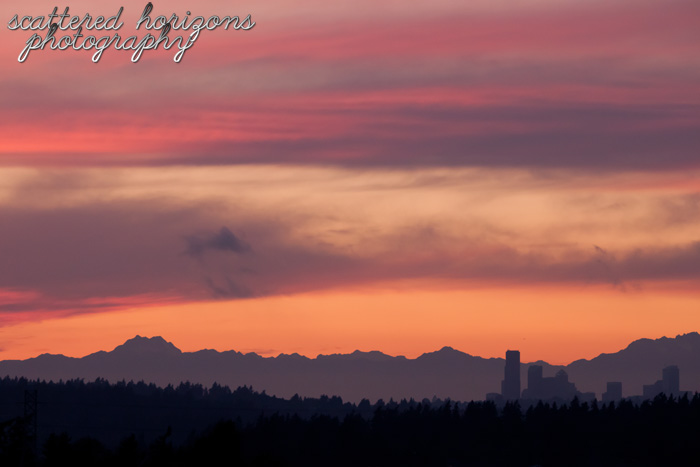
Settings: ISO 800, 100mm, ss1/2000, f/16
Date: November 25th, 2012
Location: Astoria, Oregon the Astoria Column Parking Lot
Day 151/365 - May 31st, 2013

"Neither should a ship rely on one small anchor, nor should life rest on a single hope." - Epictetus

Reverse 365 - May 2013 Wrap-Up

Number of Photos: 31
Locations: Seattle, WA / Volunteer Park Conservatory, Seattle, WA / Lousia Boren Park, Seattle, WA / Kerry Park, Seattle, WA / Mount Rainer National Park / Enumclaw, WA / Around my house / Gene Coulon Park, Renton, WA / Squakl Mountain Park / Redmond, WA / Yarrow Point Park / Astoria, Oregon / Astoria Column
Editing Techniques Used: Lightroom Tips

What I Learned: May has been a difficult month in terms of sticking to my goals with all the other things I have going on. I have faltered and felt guilty about that, but I have also felt proud that I start again. In terms of editing I focused on zeroing out my photos before editing. I shoot in RAW and until now I really didn't understand the difference when it comes to editing. I started out with applying the "Zeroed" Lightroom preset to each photo before editing and found that editing was just easier and I had more control over my images. I then found that you can apply that preset when you import your images by choosing it on the left hand side of the import window. I feel like this has truly changed my editing!


Tuesday, April 30, 2013

Reverse 365: April 2013 Wrap-Up

Number of Photos: 30
Locations: Illwaco, WA / Pacific Science Center / Seattle, WA / Commencement Bay, Tacoma, WA / Point Defiance Gardens / Oregon Coast / Sunset Lake / The Cove Normandy Park, WA / Wenatchee, WA / Lake Chelan, WA / Vancouver, WA / Washington Coast / Puyallup Fair / Louisa Boren Park, Seattle, WA / Issaquah, WA
Editing Techniques Used: Lightroom Tips
Tutorials Used: 10 Quick and Easy Lightroom Tricks

What I Learned: Lightroom is even more amazing than I knew it was! The tutorial I used above was filled with a bunch of tricks with features I hadn't used in Lightroom before. My favorites were stacking brushes and the luminance sliders. It opened my eyes to the potential that exists in the program. I can't wait to learn more uses for it as the year continues. I also discovered this month the power of RAW I was not taping into. I have shot RAW for a long time, but when I open them in Lightroom I usually leave the default settings the program puts on the photo. This month I started "zeroing" out the photos and it has allowed me so much more flexibility with my photos. I have been able to save some that I thought were not savable. It has really helped me in my present day editing as well.


Thursday, February 28, 2013

Reverse 365: February 2013 Wrap-Up

Another month, another wrap up of my Reverse 365 Project for February 2013. I am still amazed that I am keeping up with and enjoying this process so much. I am looking forward to Month #3. 

Number of photos: 28
Locations: Tolmie State Park near Olympia, WA / Around my house / Semiahmoo, WA / Birch Bay, WA / Lincoln City, OR / Siletz Bay, Lincoln City, OR
Editing Techniques Focus: Gradient Tool in Lightroom and HDR Process in Photoshop
Tutorials Used: HDR Process for Photoshop and Creating a Collage Template in Lightroom 

What I Learned: There will always be people who don't like your work or who don't see your photographs the way that you do. And that is ok! I am beginning to discover through this process that photography is truly an art form. Especially when it comes to the editing process. I know there are people out there who don't believe that but art is expression of vision and that is what I try to do with my photography. Express what I see. I have also learned this month that editing is a valuable part of the process. I love getting it right straight out of camera and I always will, but I am starting to value editing more and more and not see it as a scary thing that might "ruin" what I trying to express. Instead it can and does often enhance and better portray my vision. 


Thursday, January 31, 2013

Reverse 365: January 2013 Wrap-Up

I cannot believe that I did it, I posted a photo a day for a month! I am doing a Reverse 365 where I edit a photo from last year that I have not edited or posted previously. Each month, I plan to reflect on my progress and showcase the month of photos in a collage. So here goes January 2013...

Number of photos: 31
Locations: Around my house / Tokeland, WA / Long Beach, WA / Siletz Bay, OR / Beverly Beach, OR / Alki, WA / Kirkland, WA / Clark Lake Park, Kent, WA / Seattle Ferry Terminal, Seattle, WA / Seattle - Bremerton Ferry, WA / Bremerton - Seattle Ferry, WA / Mount Vernon, WA / Chuckanut Drive, Mount Vernon, WA
Editing Techniques Focus: Adjustment Brush in Lightroom and Soft Glow in Photoshop
Tutorials Used: Soft Glow in Photoshop and Creating a Collage Template in Lightroom (though I did the text in Photoshop as I could not make it work with the Slideshow mode)

What I Learned: The biggest thing that I learned during this process is that I find many more photos I "like" when I give it a little time. Initially after a shoot I often look at the photos and feel disappointed that I didn't get more "good" ones. I think that is because my goal is to get my shots to be the best they can SOOC (straight out of camera). With this process the goal is to edit photos so they don't necessarily have to be the best SOOC. That coupled with some time away from the images has made this whole thing a truly enjoyable process. I can't wait to see what the next month brings!

*I also learned a lot about the adjustment brush and the soft glow that I will be sharing in a future tips and tricks post.*


I am looking for more Project 365, Reverse Project 365 and Project 52s to follow. If you have one and would be willing to share let me know in the comments or on the Facebook page.

Wednesday, October 19, 2011

I Learned: Factoria Sunset 10.15.11

This week I learned that sometimes the most beautiful moments happen in the most unexpected places. On Saturday while driving around trying to find a place to photograph the sunset from, we pulled into a driveway to turn around. The driveway was to the Tmobile Complex in Factoria and it just seemed like there might be a spot to view the rapidly changing sky. After a few twists and turns and almost turning back, we reached the top building in the complex and were rewarded with one of the most beautiful sunsets I have seen that was not at the beach or on the water. I did nothing to the sky in post processing and it is almost an exact match to what I saw. I did remove a few spots in the tree line with spot removal in Lightroom and do some noise removal. Then I used the healing brush in Photoshop for some spots on the buildings. Who would of thought that these colors and view (I think of Seattle) could be found at a corporate complex in the middle of the city? I wonder what other unexpected places I can find next :o)?

Settings: ISO 800, 109mm, ss1/100, f/7.1 (full manual)
"If you do not expect the unexpected you will not find it, for it is not to be reached by search or trail." - Heraclitus


Linking up with the fabulous linkups below. Be sure to check out the other photos, you never know what unexpected inspiration you might find!


Click It Up A Notch  


Wednesday, October 5, 2011

I Learned: Clark Lake Sunset 09.30.11

This week I learned that Lightroom Presets are fun and addicting, just like Photoshop Actions. I have been downloading and trying out free presets this week. It has been a fun process and I am in awe of the creativity of those who make presets and actions. At the same time, though, I have struggled to find the balance between presets and developing my editing skills by "manually" editing. Tonight as I was editing the photo for this post I realized that one way to do it is use the presets as a jumping off point or an inspiration. I was looking at the different presets on this photo and found one that did what I wanted to do with the editing...sort of. So I worked with the settings in an attempt to add what the preset did while getting rid of what I didn't like. My goal was to maintain the sky color but lighten up the foreground. I have not gotten the hang of backlighting yet so I had to make it work post processing. I hope to achieve this look SOOC next time :o).

Thank you for stopping by and leaving your thoughts and critiques!

Settings: ISO 200, 28mm, ss1/6, f/10 (full manual on tripod)
"One of the most satisfying experiences I know is fully to appreciate an individual in the same way I appreciate a sunset. When I look at a sunset...I don't find myself saying, 'Soften the orange a little more on the right hand corner, and put a bit more purple along the base, and use a little more pink in the cloud color...' I don't try to control a sunset. I watch it with awe as it unfolds." - Carl R. Rogers 

Linking up with Click it Up a Notch for I Learned and What's Up Wednesday. Be sure to check out what others have learned this week and the other photography blogs!


Click It Up A Notch

Wednesday, September 21, 2011

I Learned: Wild Cat Rollercoaster 09.17.11

This week I learned that sometimes meeting my goal of posting a photo a day is difficult. Especially when I start a new link up. Yesterday I decided to start a link up called Tones on Tuesday, a chance to show off your photos where you altered the tones - black and white photos, sepia toned photos, etc. I ran into some problems with coding and images and my computer was not cooperating. Add to that getting home late from work and not feeling well. It was stressful to say the least. I stuck with it though and was able to get it up and running. I am afraid that the late posting may result in less link ups, but you live and learn for next time :o).

Ooh, I also learned I love Pioneer Woman's actions! Here is my photo from Tones on Tuesday just with a different tone. I used PW's Old West Action. If you have a picture with altered tones I would love it if you linked up with Tones on Tuesday here.

Thanks for reading! Critiques are welcome!

Settings: ISO 200, 32mm, ss1/200, f/6.3
“I'm always mentally photographing everything as practice.” - Minor White

Linking up with Click it Up a Notch for I Learned. Be sure to check out what others have learned this week!


Click It Up A Notch

Wednesday, September 14, 2011

I Learned: Sunbursts at Fort Ward 09.10.11

Another photography first for me this weekend was capturing sunbursts. During an exploration of Fort Ward Park on Baingbridge Island, I saw the sunburst through the trees and I attempted to capture it. It did not work out and I was discouraged. Before giving up completely though, I decided to do a quick search on my phone and found a blog, that I can't remember the name of, where the suggestion was a high aperture and patience. With these both in place I was able to transfer the beauty of the sunburst from in person to my memory card :o). I went a little crazy taking them after that, but I was very excited that I had added a new skill to my photography arsenal.

My goal was to capture the sunburst and the sun on the water. In post processing, I adjusted most of the basic settings and used a graduated filter on the sky. This was only my third or fourth time with the graduated filter and I am not sure how it worked out. I would love to hear your thoughts and suggestions. Thank you for stopping by!

Settings: ISO 100, 41mm, ss1/100, f/22 (full manual)
"The earth has received the embrace of the sun and we shall see the results of that love." - Sitting Bull

Linking up with I Learned at Click it Up a Notch. Be sure to see what everyone else has learned this week! 
Click It Up A Notch

Wednesday, September 7, 2011

I Learned: Lily Pads of Beaver Lake 09.03.11

My day has been filled with learning! I discovered new ways to make life easier at work and I discovered another wonderful feature of Lightroom. I decided to go with another lily pad photo from the same shoot as the photo I shared yesterday. I wanted to play around with black and white as I had so much fun with my first black and white conversion last week. When I first started the conversion though, it just seemed to be missing something as the focal point disappeared without the color on the flower. This presented the dilemma of wanting to do something I had no idea how to do. I decided to turn to Google and see if I could find out how to use Lightroom to accomplish the task of leaving the flower colored and turning everything else black and white. I found a simple tutorial on Digital Photography School on the first link I tried! Highlight Color Effect in Lightroom - 5 Easy Steps is an easy to follow tutorial that allowed me to accomplish exactly what I wanted :o). I love learning new things!

Settings: ISO 100, 250mm, ss1/8, f/5.6 (full manual on tripod)
"Learning is not attained by chance, it must be sought for with ardor and diligence." - Abigail Adams

Linking up with I Learned at Click it Up a Notch and Black and White Wednesday at The Long Road to China. Check out the other photos!

the long road Click It Up A Notch

Wednesday, August 24, 2011

I Learned: Enumclaw Sunset 08.21.11

I learned two things this week:

1. A photo plan should be flexible and willing to follow the light.
2. Lightroom makes me want to learn more!

As I mentioned in my last two posts, I spent Sunday evening photographing a glorious sunset. This was not my intention at the beginning of evening as I wanted to take some pictures at Nolte State Park. While the park is beautiful with the lake and the trees, the light just wasn't adding to the shot. I was disappointed and was just going to head home. On the way, though, I noticed the beautiful sky and the light changing minute by minute. I decided to stop and just see what the light was going to do. It was amazing. I am so glad I didn't give up. Sometimes the most stunning shot is right around the corner!

One of the shots I took as I watched the light was of Mount Rainier with the setting sun hitting it. I liked how it turned out SOOC, but it was missing a bit of highlighting in the sky and on the mountain.

Settings: ISO 100, ss 0.5sec, f/18 (full manual on tripod)

For the edit I played around with most of the basic settings and did a little noise reduction. I love how you can view before and after in Lightroom and how you can use the history to step back one or more steps to see what your changes did to picture. I love the ease of use and I love learning more about the program through tutorials. Especially Courtney's from Click it Up a Notch. Her videos are so helpful!


"Which of my photographs is my favorite? The one I’m going to take tomorrow." – Imogen Cunningham


I do find that I sometimes don't know when to stop editing or how to do specific tasks like how to combine the sliders in sharpening and noise reduction to get it to do what I want. I would love feedback/critiques on this SOOC and edit. What works and what needs improvement? If you have any tips for when to stop editing and how to sharpen/noise reduce I would also love those.

Thank you for reading and commenting. I so enjoy learning from you!


Click It Up A Notch

Wednesday, August 17, 2011

I Learned: Flower Field 05.21.11

This week I learned the power of a good editing program. I have been working hard on developing my skills with manual mode and hope to begin to do all I can to make my shots look wonderful straight out of the camera (SOOC). At the same time, though, I know how much editing can do for a photo. I want to become more skilled at taking a picture to the next level with my edits. I had been using a free program called Gimp and have had fine results with it. However, after a reading a wonderfully helpful comment from Melissa about how Photoshop features can help with the editing process I decided to look at other programs. After some research I downloaded a trial version of Lightroom and the picture below is my first edit using it. I have also included the SOOC photo and would love to know what you think about my edit - what works, what I could do differently and any tips for using Lightroom. I really enjoyed using the program and found the ability to look at the before and after at the same time very helpful.

I realized when putting this post together that this photo was taken on the same road trip home as my I Learned from last week, which was not planned. Driving home from Lincoln City, one of my favorite Oregon Coast towns, I saw this beautiful field of flowers on the side of the highway. We turned around and spent some time photographing it. I loved the clouds in the sky and the colors of the entire scene. In post processing I cropped the picture to play with the rule of thirds, worked on the red, blue and green color levels, and played with the contrast and brightness.

Settings: Auto Mode - 1/250, f/11

Original Photo

Edited Photo
"Travel becomes a strategy for accumulating photographs." - Susan Sontag

This is what I learned this week, head over to Click it Up a Notch to see what others have learned.

Click it Up a Notch

Wednesday, August 10, 2011

I Learned: On the Road with Hipstamatic 05.21.11

One of the first apps I got on my iPhone was Hipstamatic. I had heard about it on a few websites and really liked what it added to the photos I saw. I decided to download it while walking on the beach in Lincoln City, where there was very little signal. Needless to say it did not download until I got back in the car and headed for home. Once it did finish downloading I had to try it out, but was riding in the car (passenger seat :o) on a stretch of highway where it was difficult to pull over. I decided to take some pictures out the window and just see what happened. This picture is one of my favorites from those shots. I was impressed with the colors and the antique feel of the photographs. I used the combination of the John lens and Ina film for my first pictures and that continues to be my favorite pairing, by far!

Since that day I have enjoyed using Hipstamatic for the interesting, unpredicted and instant outcome of having a photo where the only thinking involved is in the subject matter and composition. It is nice to focus and develop one part of my photography skills. However, this week as I have been making the switch and commitment to manual mode, I have learned that creating and controlling my pictures can be fulfilling and rewarding on such a deeper level. With Hipstamatic I pressed the button and the app did the work, but with manual mode I created the photo. Don't get me wrong, I love Hipstamatic and LemeLeme and other iPhone photography apps. But I am loving owning my pictures in a way I haven't in a long time.

Flashback #2
Location: On the road back from Lincoln City
Date: May 21st, 2011
Settings: Lens - John S, Film - Ina's 1969
What I Like: The colors and the lighting
What I Think Needs Work: The subject is a little too centered and linear for me


"I travel not to go anywhere, but to go.  I travel for travel's sake.  The great affair is to move." - Robert Louis Stevenson


That is what I learned this week, head over to Click it Up a Notch to see what others have learned.


Click it Up a Notch